White t-shirt mockup generator
An online tool, not a PSD: upload a design and every shirt in the grid is a white one wearing it, shaded like the cotton. The free ones take no login and leave no watermark.
Your design
Mockup editor
4 free white t-shirt mockups
Upload a design and it appears on every one.
175 more white t-shirt mockups in the full library
Each one is checked and measured by hand, so your design lands where a print would. They open with a Trendlytic plan, 1 credit a download, and the 3-day trial includes 15 credits. The same plan opens every other colour too: 552 members' mockups in all.
3-day free trial · from $9/mo · cancel anytime
179 white tees, 4 free to download
142 are worn, by adults, teens and children down to toddlers. 37 show the shirt alone: flat, folded, on a hanger, held up or floating. Nearly all sit against something other than white, a coloured or grey wall, a room, a street, so the shirt keeps its edge in a thumbnail.
Ink that sits in the fabric
On white, the mockup darkens the design where the shirt folds or falls into shade, so it sits in the cloth instead of floating on top of it.
White in the artwork is the shirt
Most print-on-demand printers lay no white ink on a white garment, so white areas stay bare fabric. The mockup still draws them, a shade lighter than the shirt in the photo: count any white you see there as gone in print.
How to make a white t-shirt mockup
- Pick the artwork. No Photoshop and no template file: the tool on this page does the placing.
- The white shirts in the grid take the design at once, centred on the chest.
- Open one of the free ones, set the size you want, and download a picture up to 2000 pixels wide. Cards with a lock belong to the members' library.
If you came for the empty shirt itself, a PSD to open or a blank PNG to edit, this page is not that. What it hands over is the finished picture, with your design already on the white tee.
On most printers, white is left out
A direct-to-garment printer has no reason to put white ink on white cotton, and the large providers say they do not: Printful and Gelato state it outright, and Printify says white ink is generally not printed on white fabric. Printed that way, wherever your design is white, the shirt shows through. That is harmless for a white highlight inside a coloured shape. It is a problem for white lettering, a white border or a white silhouette: on a white tee from those printers they are not there, even though the mockup above still draws them.
Pale colours fail more quietly. Lemon yellow, mint, baby pink and light grey lose most of their strength with no dark surface around them. Look at the mockup from arm's length: if the design fades, a buyer scrolling past will not see it either. Deepen the pale parts, or run a thin dark line around them.
The other side of it is good news. With no white base under them the inks sink straight into the cotton, so the print feels soft, and Gooten notes that white cotton gives the closest colour match to the file. If a design depends on its colours, white is the shirt that comes closest.
The white box that is easy to miss
A design saved with a white background almost passes on a white shirt. The box is there, a rectangle lighter than the cloth, faint where the shirt is brightly lit and plainer in the shade, easy to miss in a small picture. Then the same file lands on a black, navy or red shirt with a white rectangle around the art.
The note under the upload about a solid background appears however faint the box looks, and it is worth believing. If one design is going on several shirt colours, open the black t-shirt mockups once before you list it. Half a minute there is the cheapest proof you will get.
What the white set holds
| How the shirt is shown | White photos | Free among them |
|---|---|---|
| Worn, seen from the front | 111 | 3 |
| Worn, seen from behind | 31 | 0 |
| Laid flat or folded | 16 | 1 |
| On a hanger | 8 | 0 |
| Held up, floating or on a mannequin | 13 | 0 |
The Who row above the grid sorts the same 179 photos by wearer instead, and 40 of them show an oversized cut. For the full range of colours, go to the t-shirt mockup generator.
A white tee in a listing photo
A white shirt photographed on white has no edge, and in a search grid it turns into a print hanging in the air. So nearly every photo here sets the shirt against something else: a beige, grey, pink, yellow, sage, terracotta or blue studio wall, or a street, a park, a pier.
A white tee is also the closest thing to the white artboard most designs are drawn on, which makes it the natural first photo for dark artwork. Every download is a square. If a platform wants that square at another pixel size, the image resizer rescales it.
Before the design, the niche
How a design looks on a white tee is the last question, not the first. The first is whether people are buying that kind of design at all, and how many sellers got there before you. I built Trendlytic to answer it from what is listed and selling on Etsy, Amazon Merch, TeePublic and Redbubble: one search, and the niche comes back with how much demand it has and how crowded it is. It costs from $9 a month and opens with a 3-day trial. Every plan includes the mockup library: 552 photos beyond the free ones, at 1 credit a download.
A good mockup sells the design. The niche decides if anyone is looking.
Before you make the next design, see what is already selling. One Trendlytic search reads Etsy, Redbubble, TeePublic and Amazon Merch, shows how much demand a niche has against how many sellers are in it, and badges the designs that are rising now.
Start free 3-day trial3-day free trial · from $9/mo · cancel anytime
Frequently asked questions
How do I get my design onto a white t-shirt mockup?
Choose your artwork file with the upload button at the top. Each white shirt in the grid shows it on the chest straight away. Open one of the free shirts, drag the design or change its size on the photo, then download a picture up to 2000 pixels wide. The file stays on your device the whole time.
Can I make a white t-shirt mockup without Photoshop?
Yes. This is an online tool, not a PSD template: the design is placed and shaded in your browser, and what you download is a finished JPG or PNG. There is nothing to install and no smart object to edit. If the layered file itself is what you are after, you want a PSD mockup, and this page does not offer one.
Which white t-shirt mockups can I download for free?
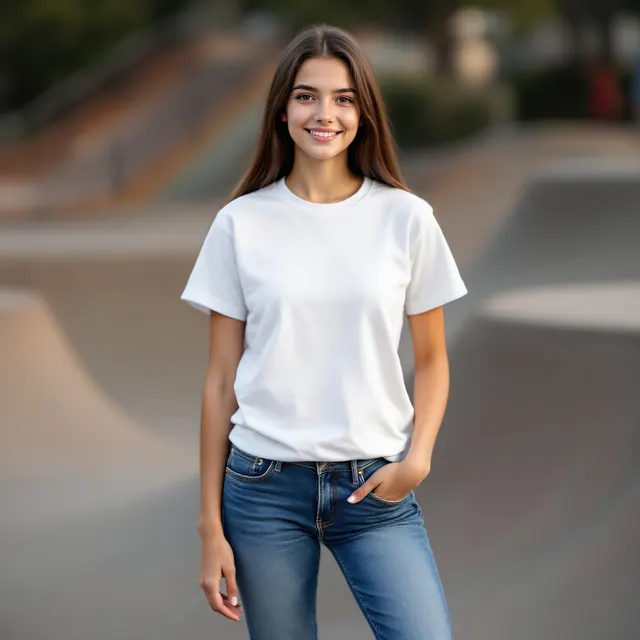
Four of the 179: white tee on a teen girl, skate park; white kids' tee on a girl, playground; white toddler tee on a boy, garden; white tee flat lay, window light. No account, no watermark, no daily cap. White shirts worn by women and men are among the members' ones. The remaining 175 belong to the members' library in the Trendlytic app, at 1 credit a download, and a handful of them appear on this page with a lock so you can see your design on them first.
Will the white or pale parts of my design show on a white shirt?
Not with the printing most print-on-demand providers use. Printful, Gelato and Printify all state that white ink is not printed on a white garment, so the white parts of the artwork are left as bare fabric, and very pale colours come out faint. The mockup does not show this: it draws white as it is in the file, a shade lighter than the shirt in the photo, so white lettering you can still read here may be missing from the print. For the version you sell on white, give those parts a darker colour or a dark outline.
My file has a white background. Why does the box show less on a white shirt?
Because the box is close to the colour of the shirt. On the mockup it is a rectangle lighter than the cotton, faint on a brightly lit shirt and plain on a shaded one, and it is still in the file. On a black or a red shirt it is a white rectangle around the design, and Spreadshirt warns that with its printing a white background shows even on white products. A note under the upload tells you when a file has a solid background: export a PNG with a transparent one.
Is there a white t-shirt mockup on a child, a teen or a toddler?
Yes. The white set has 17 photos on teens, 25 on girls, 27 on boys and 30 on toddlers. Pick one of them in the Who row and only that group is shown. Among the free white ones, three are worn by a teen or a child.
Is there a white t-shirt mockup without a model?
Yes. 16 laid flat or folded, 8 on a hanger and 13 held up, floating or on a mannequin. One of them is in the free set. The Product button in the Who row shows only these.
Does any white t-shirt mockup show the back of the shirt?
34 do: 31 are worn and photographed from the back, and 3 show the back of a shirt with nobody in it. A back print is placed on them the same way as a chest print. All of them are members' photos; the free white shirts all show the front.
May I put these white t-shirt mockups in a shop listing?
As far as the pictures go, yes, commercial use included: shop listings, ads, emails and posts. Nobody was photographed: the blank white shirts were made with AI for Trendlytic and looked over one by one, which leaves no licence terms to study and nobody to credit. Each marketplace still has its own rules for listing photos.
Should I show my design on a white shirt or a black one?
On the colour it was drawn for first, then on the other one before you offer both. Dark artwork with fine detail belongs on white, where colours print closest to the file. Light artwork belongs on black. Most designs lose something on the colour they were not made for, and a minute on the black t-shirt mockup page shows what.
More free tools
All 27 tools →Image Resizer
Resize PNG, JPG and WebP images by pixels or percentage, or size a t-shirt design for Amazon Merch, Redbubble and TeePublic. Runs in your browser.
Print Size Calculator
Turn any physical size and DPI into the exact pixel dimensions your t-shirt, poster, mug, or sticker design needs. Presets for common POD products. Free, no login.
Etsy Image Size Checker & Resizer
Drop in an image, click an Etsy size, and download it resized: banner, shop icon, listing photo and more. It also flags transparent PNGs and animated GIFs that break on Etsy.