Free mockup generator
Upload one design and see it on every mockup at once. Move it, resize it and download listing-ready pictures, free and without a watermark. Your file never leaves your browser.
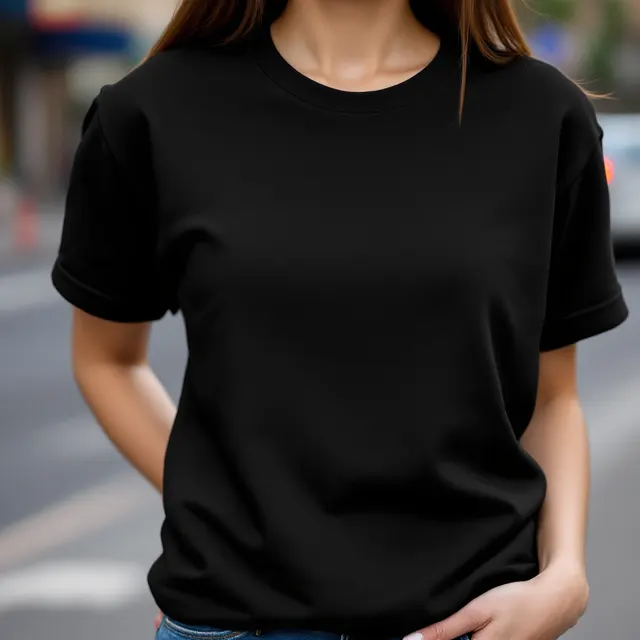
Drag the design to move it, pull a corner to resize it, use the green dot to turn it.
1Your design
2Size and position
Your size and position carry over to every mockup below.
3Download
No watermark · Free for commercial use
All 9 mockups
Upload a design and it appears on every one.
Need a different one? Generate your own mockup
3 credits · membersEvery photo is a new idea: another place, another light, another person, and it does not come back the same. Say who wears it and pick the colour, or leave the rest on Surprise me. Your design drops onto it like any mockup above, and the photo is saved on this device.
Product
Who wears it
Colour
Place
AI generation opens soon. The ready-made mockups above work now, and nothing is charged.
One upload, every mockup
Your design appears on all 9 photos at once, so you compare colours and scenes in one look instead of building each picture separately.
Looks printed, not pasted
The design takes on the folds and the light of the fabric under it, on a white shirt and on a black one.
Free, and yours to use
No account, no watermark, no daily limit. Download one picture or the whole set as a ZIP, cleared for commercial use.
How to make a mockup
- Upload your design. A PNG with a transparent background is best, the same file you give your print provider. The empty space around the artwork is trimmed for you.
- Look at the grid. Your design is already on every photo, so you can see at once which ones suit it.
- Click a photo to work on it. Drag the design into place, pull a corner to resize it, then download that picture or the whole set as a ZIP.
What makes a mockup worth using
A mockup has one job: let a buyer see the finished product in the second they give a thumbnail. Three things decide whether it does.
The design has to read small. Most buyers meet a listing as a thumbnail in a grid of other listings. A close crop on the chest beats a full-length photo where the print is a smudge.
The print has to look printed. A design pasted flat over a wrinkled shirt reads as fake at a glance. Here the design picks up the folds and the light of the fabric under it, which is the difference between a mockup and a screenshot.
The product has to be the one you sell. Show the colour you actually offer. A listing photo is a promise about what arrives in the post.
Where each kind of mockup works best
| Photo | What it shows | Use it for |
|---|---|---|
| On a model | Scale and fit: how big the print is on a person | The first listing photo, Instagram, ads |
| Flat lay | The whole design, with no body curve bending it | The second listing photo, a store's product grid |
| On a hanger | The garment on its own, clean and neutral | Showing a second colour without repeating a pose |
| Styled flat lay | A mood, with a prop or two beside the product | Pinterest pins and social posts |
Where you need your own mockups, and where you do not
On Amazon Merch, Redbubble and TeePublic you upload the design file and the marketplace draws the product pictures itself. Your own mockups do their work on Etsy and on your own store, where the listing photos are yours to supply, and everywhere you promote: Pinterest, Instagram, Facebook groups, email.
For Etsy, download at 2000 pixels, the shortest side Etsy recommends for a listing photo. If another platform wants an exact size, the image resizer gets you there, and the Etsy image size checker covers banners and shop icons.
Ready-made mockups and AI mockups
The photos in the grid are ready-made and free. They were generated with AI as blank products, looked over one by one, and measured so a design lands where a print would.
Under the grid there is a second option for members: generate your own. You say who wears the product (a woman, a man, a teenager, a child or a toddler), pick its colour and the place, and a new photo is made for you, a different idea every time. It costs 3 credits, because every image costs us money to make. The free grid never does.
Before you design the next one
A mockup makes a design look its best. It cannot make people search for it. What decides whether a design sells is the niche: whether buyers are there, and how many sellers already are.
I built Trendlytic for that question. One search covers Etsy, Redbubble, TeePublic and Amazon Merch, shows what is selling in a niche and how crowded it is, and marks the designs that are climbing. It starts at $9 a month, with a 3-day trial.
A good mockup sells the design. The niche decides if anyone is looking.
Before you make the next design, see what is already selling. Trendlytic searches Etsy, Redbubble, TeePublic and Amazon Merch at once, scores each niche for demand against competition, and marks the designs gaining ground right now.
Start free 3-day trial3-day free trial · from $9/mo · cancel anytime
Frequently asked questions
What is a mockup generator?
A mockup generator puts your artwork onto a photo of a real-looking product, so a buyer sees a finished t-shirt instead of a flat design file. You upload the design, choose a photo, and download a picture ready for a listing, an ad or a social post. This one draws the result in your browser, so the file you upload is never sent to a server.
Is this mockup generator really free?
Yes. Every ready-made mockup is free to use and download as often as you like, with no account, no watermark and no daily limit. One part is paid and optional: generating a brand-new photo with AI costs money for each image, so it uses credits from a Trendlytic plan.
Can I use the mockups in my Etsy or Shopify listings?
Yes. The blank product photos were generated with AI for Trendlytic, so there is no stock-photo licence or model release attached to them. Use what you download commercially, in listings, your own store, ads, emails and social media, with no credit required.
How is this different from the Printify or Printful mockup generator?
Those live inside each provider's product editor and show the exact blanks that provider prints, which is what you want for a final product page. This one is a standalone tool for any design: lifestyle, flat lay and hanger photos you can use wherever you sell or promote. Many sellers use both, the provider's mockup for accuracy and a lifestyle mockup for the first photo.
What does the AI mockup generator do?
It makes a new blank product photo for you. You say who wears it (a woman, a man, a teenager, a child or a toddler), pick the colour and the place, or leave those on Surprise me. Every photo is a new idea, with a different place, light and pose each time, and your design is placed on it like on any other mockup. It is the paid part of the tool, at 3 credits per photo on a Trendlytic plan.
Why does my design show a white box around it?
The file has a solid background. A JPG always has one, and so does a PNG exported without transparency. Export the design as a PNG with a transparent background and only the artwork will show on the product.
More free tools
All 27 tools →Image Resizer
Resize PNG, JPG and WebP images by pixels or percentage, or size a t-shirt design for Amazon Merch, Redbubble and TeePublic. Runs in your browser.
Print Size Calculator
Turn any physical size and DPI into the exact pixel dimensions your t-shirt, poster, mug, or sticker design needs. Presets for common POD products. Free, no login.
Etsy Image Size Checker & Resizer
Drop in an image, click an Etsy size, and download it resized: banner, shop icon, listing photo and more. It also flags transparent PNGs and animated GIFs that break on Etsy.