TL;DR: Both generators are free and open inside product creation: you save a product, then choose among its templates. Printify accepts your own mockup uploads and, on Premium, makes AI scenes even for published products. Printful's AI mockups are free (10 attempts a day) but only for select apparel on new products, and Printful takes no uploads. Keep one provider mockup in every listing as the faithful shot; add a separate tool for variety, one design on many wearers, or promoting designs sold on TeePublic, Redbubble or Amazon Merch, where these images have no use.
If you sell through Printify or Printful, you already have a mockup generator, even if you never went looking for one. It is not a separate tool. It appears the moment you save a product, and the images you pick there are the ones that land on your Etsy or Shopify listing.
That convenience has a side effect: thousands of shops choose from the same templates on the same blanks.
On November 24, 2026, I read both companies' mockup pages, help centers and pricing to set down how each generator works, what it costs, what it will not do, and when a second tool pays off. Every fact about them comes from their own sites, dated; anything only visible inside an account is left out. Trendlytic, which I built, has a mockup library too, covered near the end with its limits.
How the Printify mockup generator works
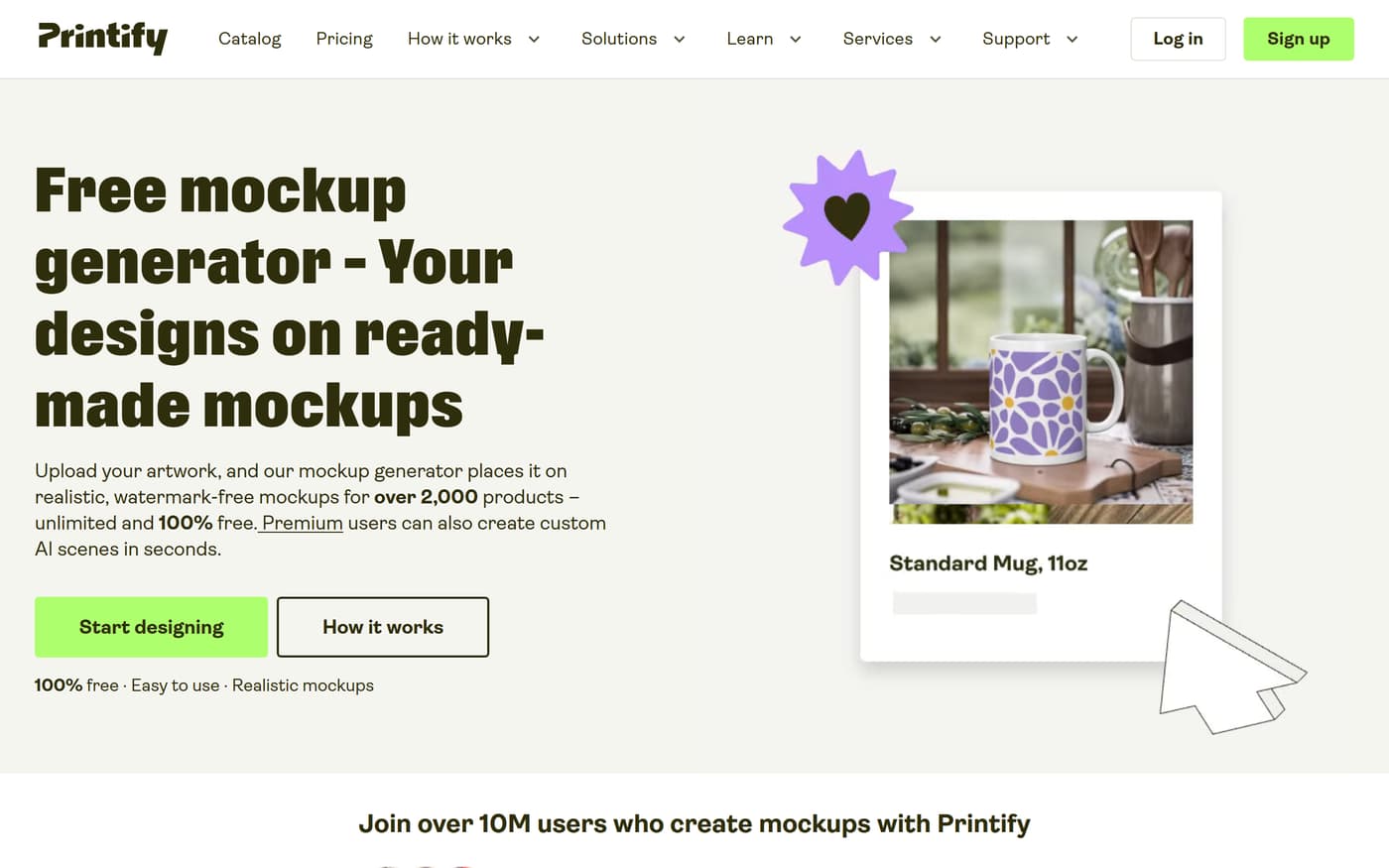
Printify's generator is part of the Product Creator rather than a tool of its own, and it runs in the browser and in the Printify app for iOS and Android (printify.com/mockup-generator, November 2026). A free Printify account is enough.
Step by step
- Choose a product from the Catalog. Printify counts more than 2,000 items.
- Upload your artwork in the Product Creator, place it, and click Save.
- The mockup options open by themselves: front, back, folded and other views, depending on the product. Tick the ones you want and click Save selection.
- Publish to your connected store, or keep it as a draft.
- To download later, go to My products, open the product, select the mockups and click Download all.
What you get
Printify says every Catalog product has its own templates: flat lays, lifestyle scenes, close-ups and multi-angle views. For t-shirts it adds hanging displays, collar close-ups and models; for hoodies, the sides and close-ups of the fabric (printify.com/mockup-generator, November 2026). The set varies by product, so a model shot is not guaranteed.
The standard tool is free for every user, with no subscription and no cap, and Printify describes its mockups as watermark-free. Its FAQ says they can go into listings, onto websites, into ads and across social media.
The Mockup Library downloads with a white or transparent background (the Product Creator preview keeps the white one), and the preview switches between RGB and CMYK. CMYK sits closer to print, RGB looks brighter, and your choice also applies to the mockups sent to your store, never to the print file (help.printify.com, November 2026).
Printify calls the images high-resolution but gives no pixel size or file format for a standard download; checking that needs an account.
Uploading your own photos and backgrounds
Here Printify goes further than Printful. Inside the Mockup Library, an Upload option takes mockups you made elsewhere: Placeit images, bought templates, or photos from a sample shoot. It accepts JPG, PNG and SVG up to 30,000 × 30,000 px, and you link each upload to a variant before publishing. Printify asks that the picture closely match the real product.
A smaller feature replaces the white backdrop of a mockup view with an image from your device. It exists on a limited number of products, t-shirts and mugs among them, and each view can take a different file. Printify recommends 2048 × 2048 px and warns that a smaller image can come out blurry. The Customization filter in the Catalog shows which products have it.
AI mockups (Premium)
AI mockups are part of Printify Premium. You pick a colour and print area, choose With model or Close-up, set the model's age range, appearance and pose, then take one of six preset backgrounds, from Cozy room to Sunlit blinds, or type your own prompt. It also works on products that are already live: open the product, click Use AI, apply the result to the listing, and republish so the store picks it up (help.printify.com, November 2026).
Printify gives two numbers for the daily cap. Its pricing page and help center say 25 attempts a day; the mockup generator page still says 10 every 24 hours. Only select products are covered, some embroidery bestsellers included. Printify's pricing page (November 2026) lists Premium at $39 billed monthly, or $299 for a full year, which it presents as $24.99 a month. The plan is mainly there for product discounts of up to 20% on most of the Catalog, so buying it for AI mockups alone rarely adds up.
Getting the images to Etsy or Shopify
The Mockup Library controls what your listing shows. Each colour group can get its own set, and whatever sits in first position becomes the title image. It works with every sales channel except PrestaShop and API stores. A newly added AI mockup goes to the end of the list, so check the order before you publish.
Limits
- It pictures Printify products only, on Printify's own templates.
- AI scenes are a paid feature with a daily cap.
- The background swap exists on some products, not all.
How the Printful mockup generator works
Printful also folds mockups into design. You start in the Design Maker or in Product templates on your dashboard, and a finished mockup set comes with every product you save. It runs in a desktop browser with nothing to install, and you need a free Printful account (printful.com/mockup-generator, November 2026).
Step by step
- Sign up or log in.
- Open Product templates, choose an item, add your design and save the template.
- Pick the mockups for your listing, or open the AI mockups tab if the product is eligible.
- To download a whole set, hover over a template and choose Download mockups, or, for a published product, click Edit and then Download mockups. Select the styles, click Generate files, then Download mockups (help.printful.com, November 2026).
What you get
Printful describes templates running from lifestyle shots to clean studio backgrounds, with diverse models, scenes and angles, for every Catalog product; its Free plan lists 610 products (printful.com/pricing, November 2026). When publishing, you pick a main style and print area (front, back or another), star the colour that becomes the main product image, and add styles under the Additional tab.
Standard templates are free and unlimited. Printful says you may use the images on your website, social channels, apps, ads and email campaigns. Its mockup page says nothing about watermarks and, like Printify's, gives no pixel size or format for a standard download.
AI mockups, free with any account
Printful's AI generator costs nothing and allows 10 attempts a day. It has two types: With model, where one of Printful's AI models wears the product, and Isolated product, the item on its own. Printful says the AI keeps your artwork exactly as uploaded and generates only the scene around it.
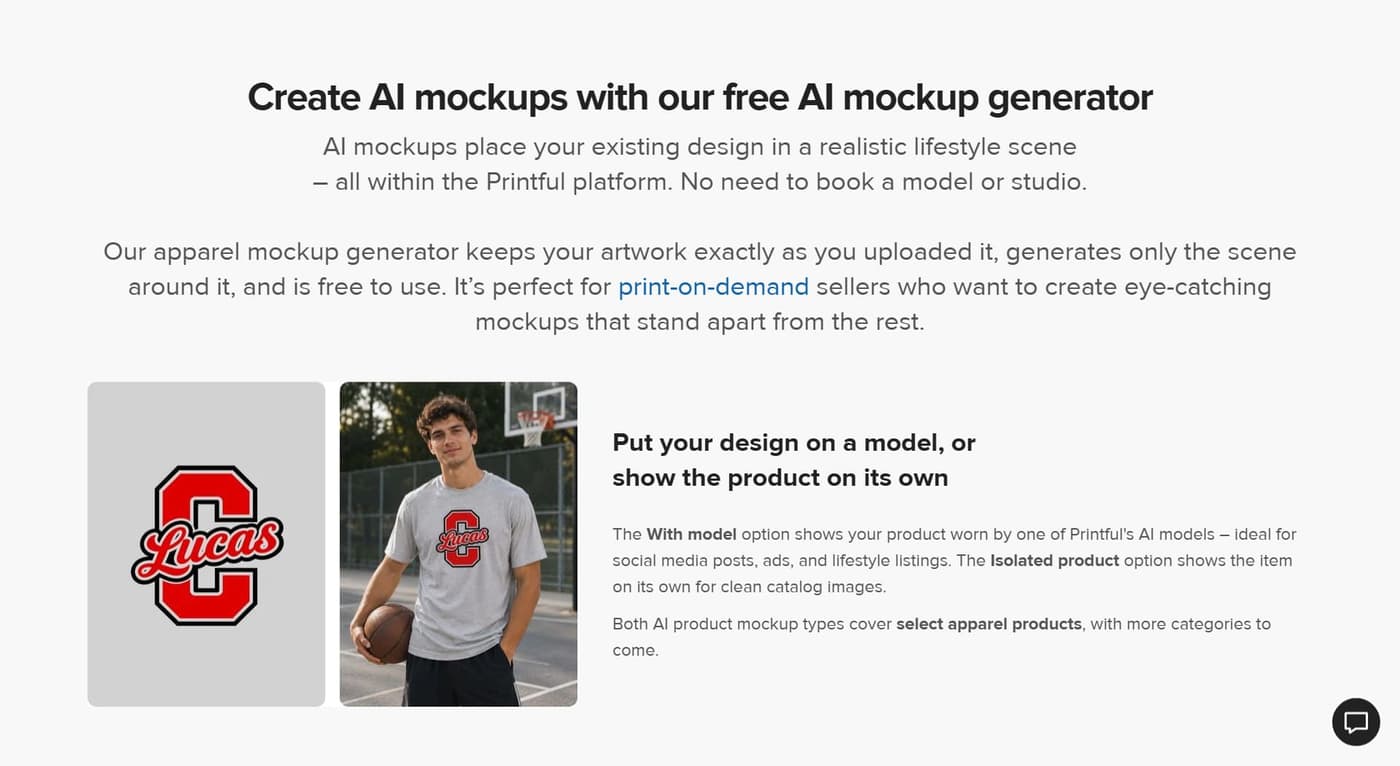
The catch is coverage. It works on select apparel, t-shirts and hoodies among them, and only when you are creating a new product: you reach it after clicking Publish, in the AI mockups tab of the Mockup library (help.printful.com, November 2026). An older listing cannot get an AI scene that way.
Some regular Printful templates use AI-generated models as well, flagged with a disclaimer on the catalog page and at the mockup selection step.
Your own photos
Printful's help center leaves no doubt: you cannot upload mockup images to Printful. A mockup made in Placeit or anywhere else goes straight to your store platform. The mockup page does mention uploading your own background images for select products, with 2048 × 2048 px recommended. The Custom Mockup Maker, which offered scenes with props and downloads at 2000 × 2000 px, is being phased out in favour of AI mockups.
Getting the images to Etsy or Shopify
The selected mockups travel with the listing to your connected store, though not every integration takes the Additional styles. Changing the images of a live product means editing it and passing back through the mockup step, and Printful warns that some integrations add the new images without removing the old ones, which you then delete by hand (help.printful.com, November 2026).
Limits
- It pictures Printful products only, and takes no uploads.
- AI scenes: select apparel, new products only, 10 tries a day.
- A paid plan changes nothing here. The Free plan already includes the Mockup Generator, and Printful Growth ($24.99 a month) lists product discounts, not mockup features (printful.com/pricing, November 2026).
Printify vs Printful mockup generator, side by side
| Printify | Printful | |
|---|---|---|
| Where it lives | Product Creator and Mockup Library, in the browser and the iOS and Android app | Design Maker and Product templates, in a desktop browser |
| Account | Free account | Free account |
| Standard templates | Free, unlimited | Free, unlimited |
| Products covered | 2,000+ | 610 on the Free plan |
| Styles it names | Flat lays, lifestyle scenes, close-ups, multi-angle views; varies by product | Lifestyle shots to studio backgrounds, models, several angles |
| AI mockups | Premium only ($39/mo or $299/yr) | Free with any account |
| AI daily cap | 25 (pricing page, help center); 10 (mockup page) | 10 |
| AI coverage | Select products, new or already published | Select apparel, new products only |
| Upload your own mockups | Yes: JPG, PNG or SVG, up to 30,000 px | No; upload to your store instead |
| Replace the background | Some products (t-shirts, mugs), 2048 px recommended | Select products, 2048 px recommended |
| Watermark | None, per Printify | Not mentioned on its page |
| Download options | White or transparent background in the Mockup Library | Bulk download through Generate files |
| Pixel size stated | No, "high-resolution" only | No for standard; 2000 px for the retiring Custom Mockup Maker |
| Where you may use them | Listings, websites, ads, social media | Website, social, apps, ads, email |
| Sent to your store | Yes, a set per colour group | Yes, main plus additional styles where the integration allows |
Sources: printify.com/mockup-generator, printify.com/pricing, help.printify.com, printful.com/mockup-generator, printful.com/pricing and help.printful.com, all read on November 24, 2026. Have not picked a supplier yet? My Printful vs Printify post weighs fees, catalog and shipping.
AI models and the New York disclosure rule
Both help centers carry this warning. Since June 9, 2026, a New York State law (Senate Bill S8420-A) has required anyone running commercial ads aimed at New York consumers to disclose a photorealistic AI-generated person. Printify's article rates paid ads, marketplace listings and email marketing as likely in scope, organic social posts as unclear, and flat lays or hanger shots with nobody in them as outside it. Neither company's article is legal advice.
So any mockup showing an AI person raises the question, whichever tool made it, our own library included: its photos are AI-generated too.
When the built-in generator is enough
For many sellers it is. Stay with it if:
- Each design is printed by one provider and sold in one store. The template shows that provider's blank, colour and print area, which is what the buyer gets.
- You need a clean first photo for search results. A plain product view does that well.
- You are testing many designs. The mockups publish with the product, with nothing to download or re-upload.
Whatever else you add, I would keep one provider mockup in every listing: it is the image that cannot misrepresent the garment.
When a separate mockup tool helps
- Your niche already looks the same. Every shop on a provider draws from the same templates, so in a crowded search your listing can sit beside others with the identical model and pose.
- You want one design on many wearers. Provider mockups come product by product, so checking a design on a toddler, a teenager and a grown-up means building three products. A library that puts one upload on every photo answers that in a minute.
- The same design sells on TeePublic, Redbubble or Amazon Merch. Those marketplaces build product images from your design file, so there are no listing photos to supply. Your own mockups do their work off the marketplace, on Instagram, Pinterest, email and Facebook groups, and a neutral photo fits there better than a provider's blank that a TeePublic buyer will never receive.
- The AI does not cover your product. Both AI features are limited to selected items, and Printful's only works on new products.
For a wider field, my best t-shirt mockup generator list and its hoodie version weigh paid and free tools on licence, price and scenes.
Where Trendlytic's mockup library fits
Trendlytic is mine, so read this part knowing that.
The library holds 1,065 photos: 560 t-shirts, 269 pullover hoodies and 236 crewneck sweatshirts. They are sorted by wearer, from toddlers and kids to teens and adults, plus shots with nobody in them, and by scene: on a model, flat lay, on a hanger, lifestyle. Black and white make up most of it.
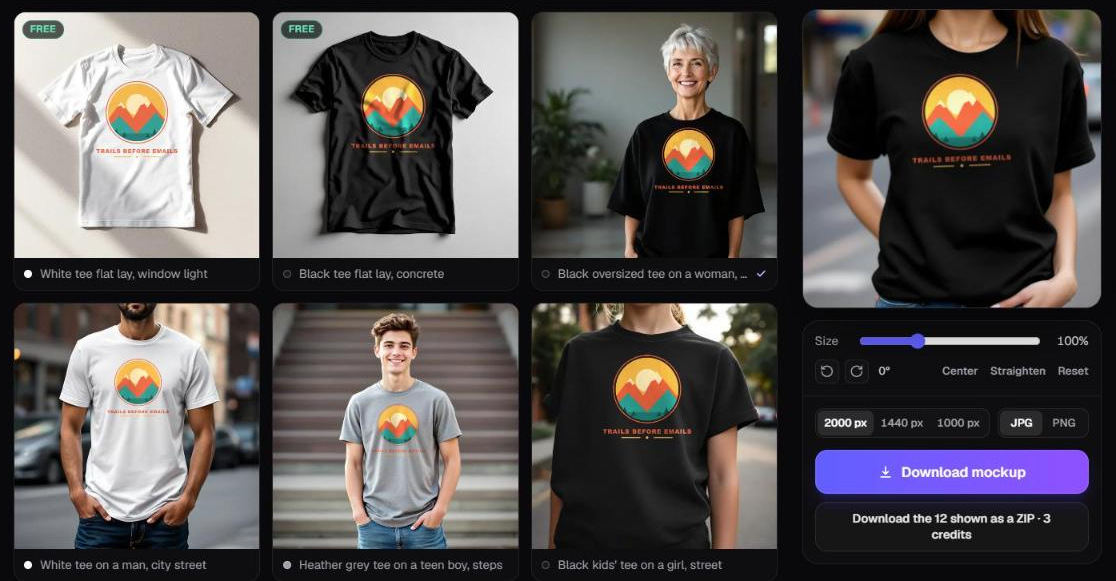
You upload a design once, ideally a transparent PNG, and it shows up on all of them at once. Drag it, resize it or turn it. Downloads come in three sizes (2000, 1440 or 1000 px), in JPG or PNG, singly or as a ZIP holding as many as 60, and your design is drawn onto the photo in your browser. Twenty-four photos, eight each of t-shirts, hoodies and sweatshirts, are on the free mockup generator: no login, no watermark, no daily limit, and commercial use without crediting us. The rest open inside the app for members, and a mockup you download there stays yours. Selling on Etsy? The Etsy mockup generator shows how the library fits Etsy's photo sizes.
What it does not do:
- Clothing only. No mugs, totes, posters or phone cases, and no zip hoodies.
- AI-made photos. Every blank photo, people included, was generated with AI, then looked over and measured for the print area. The New York point above applies to them.
- No custom scenes. You choose among the photos we made. You cannot describe a setting, generate a new one, or upload your own background.
- A generic blank, not your provider's. Match the shirt colour to one your provider sells, and keep the provider's own mockup in the listing.
- No store sync. You download the images and upload them to Etsy or Shopify yourself.
- Enlarged at 2000 px. Each photo is 1440 px square at source, so the largest download scales it up a little.
How I would combine them in one listing
- First photo: the provider's plain product view, for the thumbnail.
- Second: the provider's model or AI scene, if the product has one.
- Third and fourth: library photos of the people who buy this design.
- Fifth: the second colour, or the back for a back print.
Printify takes the first selected image as the title image; Printful takes the one you star.
FAQ
Is the Printify mockup generator free? Yes. Printify says the standard generator, templates and design tools are free for every user, with no subscription and no limit on downloads. AI mockups need the Premium plan, priced at $39 monthly or $299 yearly.
Is the Printful mockup generator free? Yes, including the AI mockups, which give any account 10 attempts a day on select apparel. Standard templates are free and unlimited.
Can I download mockups without publishing the product? Yes on both. On Printful, save a product template and choose Download mockups from it. On Printify, save the product as a draft, then download from the Product Creator preview or from My products.
Can I upload my own mockups to Printify or Printful? Printify, yes: JPG, PNG or SVG up to 30,000 × 30,000 px in the Mockup Library, linked to a variant. Printful, no: its help center says mockups made elsewhere go directly to your store platform.
Can I use Printify or Printful mockups on TeePublic, Redbubble or Amazon Merch? Not as listing photos. Those marketplaces generate the product images themselves, and a provider's mockup pictures its own blank, which is not what a buyer there receives. Use your own mockups to promote those listings on social media and by email.
What size are Printify and Printful mockups? Neither company gives the pixel size of a standard download on its public pages, only "high-resolution". Both recommend 2048 × 2048 px for your own backgrounds, and Printful's retiring Custom Mockup Maker exported 2000 × 2000 px.
Do I have to disclose AI models in my mockups? Possibly. New York's Senate Bill S8420-A, in force since June 9, 2026, requires a disclosure when an AI-generated person appears in a commercial ad aimed at New York consumers, and Printify counts marketplace listings as likely in scope. Neither company's article is legal advice.
Final thoughts
For Printify and Printful sellers, the built-in generator is the right default: free, true to the product and wired to your store. Printify is the more open one, with uploads, background swaps and paid AI on existing listings; Printful gives everyone AI scenes but keeps the rest inside its templates. Bring in a separate tool for variety, one design on many wearers, or places your provider's mockups do not reach.
A better photo cannot rescue a niche nobody is buying in, and that is the other half of Trendlytic, the tool I built. One search reads Amazon US, Etsy, TeePublic and Redbubble, shows what already sells in a niche and how many shops compete there, and you can run a USPTO lookup on any phrase you choose. Plans start at $19.99/month for 100 credits, which read up to 12,000 designs on the marketplaces with a verdict on every niche, plus the 1,000 top designs in Best Design Instant, re-ranked every hour. The same plan opens the full mockup library, where one upload puts your design on 1,065 photos of tees, hoodies and sweatshirts. It starts with a 3-day trial that asks for a card: start your 3-day trial.
Which do you lead your listings with right now, the provider's template or a photo from somewhere else, and have you seen a difference in clicks?
Try Trendlytic
Find your next winning POD niche in 40 seconds
Live data from TeePublic, Amazon Merch, Redbubble, and Etsy, and a one-click USPTO lookup on any phrase. Then turn any winner into a listing for a design of your own in that niche. Plans from $19.99/month.
Start researchingLiked this? Learn niche research in 5 short emails.
One email a day for 5 days: how sellers pick niches, why designs fail, and how to check yours. Unsubscribe in one click.
Keep reading
- Trendlyticsmartmockups alternatives
Smartmockups Alternatives: 8 Mockup Tools for 2026
The JournalSmartmockups Alternatives: 8 Mockup Tools for 2026
November 23, 2026 · 20 min read
- Trendlyticplaceit alternatives
Placeit Alternatives: 8 Picks for POD Sellers in 2026
The JournalPlaceit Alternatives: 8 Picks for POD Sellers in 2026
November 16, 2026 · 17 min read
- Trendlyticetsy black friday
How to Run an Etsy Black Friday Sale in 2026
The JournalHow to Run an Etsy Black Friday Sale in 2026
November 22, 2026 · 18 min read