TL;DR: A mockup is a realistic picture of a design shown on the finished thing, made before that thing exists. In app and web design it means a static, full-colour screen: more detailed than a wireframe, not clickable like a prototype. For sellers, it means a product photo with your artwork on it: a t-shirt on a person, a mug on a desk. Print-on-demand listings run on them, because the product is only printed after someone orders. A good one looks printed rather than pasted, shows a colour you sell, keeps the design at a printable size, and comes with a licence for commercial use.
A mockup is a realistic picture of how a design will look on the finished product, made before the product exists. You take a photo or a 3D model of a blank item, place your artwork where it would be printed, and end up with an image that looks like the real thing.
Search the word and you get two answers. Most of page one comes from app and web design companies, where a mockup is a polished screen layout. If you sell t-shirts, mugs or prints, it means something more concrete: the photo in your listing.
I'll cover the first meaning briefly and spend the rest on sellers: product mockups, their types, how they're made, what works in a listing, and the licence questions people skip. I run Trendlytic, a research tool for print-on-demand sellers with a mockup library, so I've looked at a lot of shirts with pretend prints on them.
What a mockup means, in plain words
Outside design jargon, a mockup is a model of something, built to show how it will look rather than to work. Every use of the word shares three ideas: it shows the look, not the function (you can't wear a mockup of a t-shirt); it comes before the real thing, so you can judge or even sell an idea before paying to make it; and it should pass, at a glance, for the finished product. Mockup, mock-up and mock up are the same word.
Mockup vs wireframe vs prototype
Google mixes the user-interface meaning into this search, so here is how designers use the three words.
| Stage | What it is | Level of detail | Can you click it? |
|---|---|---|---|
| Wireframe | A rough layout of a screen: boxes for the menu, text and images | Low, often grey boxes | No |
| Mockup | The same screen with real colours, fonts, pictures and copy | High, looks final | No |
| Prototype | A version you can tap through to test how it behaves | Rough to final | Yes |
The usual order is wireframe, then mockup, then prototype: structure first, then the look, then the behaviour.
For a product seller, the middle row is the one that carries over: past the rough idea, short of the real object. The difference is the audience. A designer shows a screen mockup to a developer; you show yours to a buyer.
What is a product mockup in print on demand?
In print on demand, nothing exists until someone pays. The shirt is a blank at the print provider and your design is a file. When an order comes in, the provider prints that file on that blank and ships it.
So the photo a buyer sees can't be a photo of your printed shirt, unless you ordered a sample and shot it yourself. It's almost always a mockup, built from three parts:
- The blank: a photo, or a 3D model, of the product with nothing printed on it.
- The print area: the part of the photo where a print would sit, mapped to the product's shape so the artwork bends with a sleeve or curves around a mug.
- Your design: usually a PNG with a transparent background, the same file you send the printer.
Whether you make your own depends on where you sell. On Amazon Merch, Redbubble and TeePublic, you upload the artwork and the marketplace builds the product images. On Etsy, Shopify or your own store, the listing photos are yours to supply, and the same pictures end up on Instagram, Pinterest and in ads. That's where mockup quality starts to decide sales. My Etsy print on demand guide covers the rest of that setup.
Why listings use mockups
Buyers can't touch the product. A design on a white background says nothing about how big the print is, how its colours look on fabric, or whether it suits the buyer. A shirt on a person answers all three in a second.
People buy the picture of themselves using it. A mug on a cluttered desk, a print above a sofa, a hoodie on someone walking a dog in the rain. The buyer recognises a moment, not just an object.
Photographing everything isn't realistic. One design in five colours on three garments is fifteen products, and a sample and photo shoot for each would cost more than most designs earn. A mockup shows all fifteen from one file.
They're a check for you too. A design on a black shirt and a white one, before you list, is the cheapest way to catch text that disappears on dark fabric or a layout too tall for a hoodie front.
The main types of mockups
| Type | What it shows | Best for | How it's usually made |
|---|---|---|---|
| Flat lay | The product laid flat, shot from above | The clearest view of the design, often the first photo | Photo template |
| On-model or lifestyle | A person wearing it, or the product in a real setting | Scale, fit, mood and who it's for | Photo template or AI photo |
| Hanging | The garment on a hanger or hook | A neutral shot, extra colours without a new pose | Photo template |
| Ghost mannequin | The garment shaped as if worn, nobody inside | A clean catalogue look | Edited mannequin photo or 3D render |
| Close-up | A tight crop of print and fabric | Texture and small text | A crop of a larger mockup |
| 3D or AI-generated | A computer model, or a photo made by an image model | Mugs, odd angles, scenes costly to shoot | 3D software or an image model |
| Video | A short clip: a shirt turning, a mug lifted | Movement where video is allowed | Video templates |
A few notes on the types sellers get wrong most.
Flat lays are underrated. In a crowded search grid, a shirt laid flat with the design filling a good share of the frame often reads better than a full-length photo of a person, where the print shrinks to a few pixels.
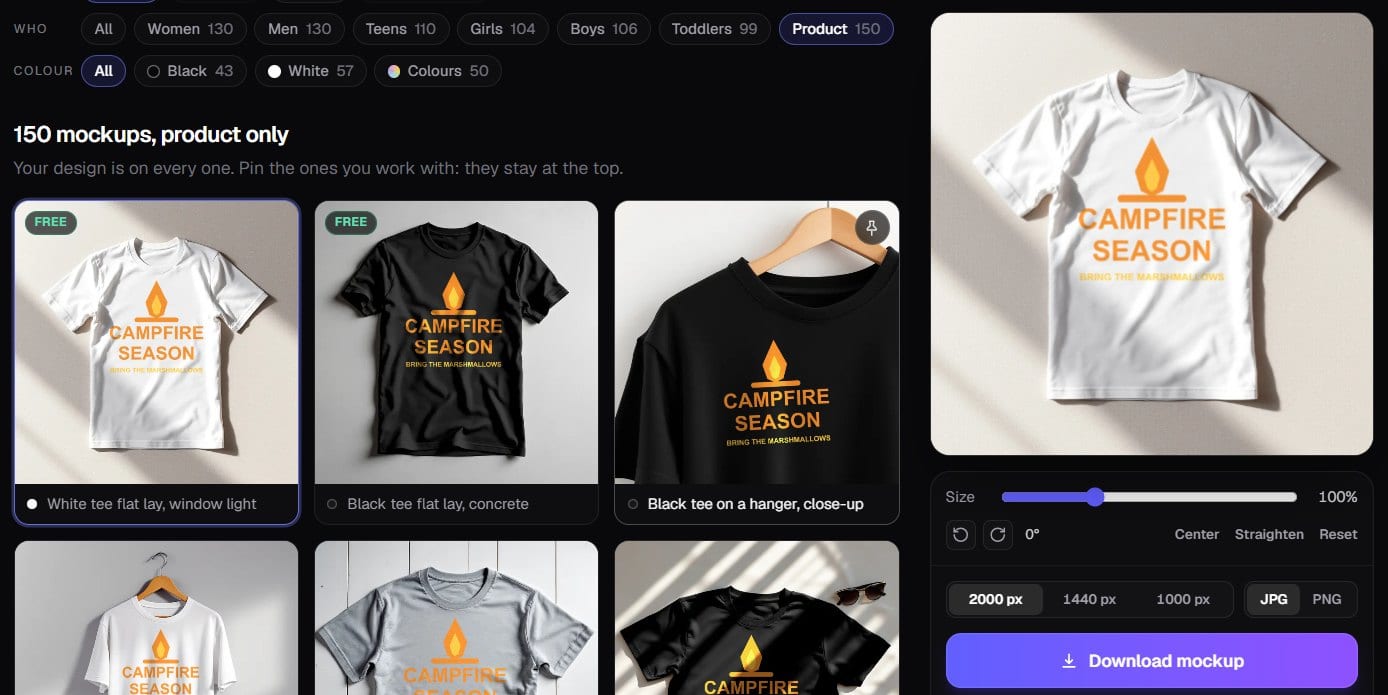
On-model shots should match the buyer. A toddler design belongs on a toddler's tee, and a design for new grandparents looks odd on a twenty-year-old. Ghost mannequin photos look tidy but say little about who the product is for, so pair them with a person. Video is worth testing once the photos are right; Etsy lets you add a short one to a listing.
How mockups are made
Photoshop templates with smart objects
The classic method. A PSD file is built around a photo of a blank product, with a smart object inside: a layer you open, paste your design into and save, and the template warps the artwork onto the product and adds the shading. Photopea, a free browser editor, opens most of these files too. Full control, at the cost of time and one licence to read per file.
Online mockup generators
You upload a design, it lands on a library of product photos, and you download the ones you like. Placeit, Canva with Smartmockups, Mockey and Dynamic Mockups work like this. I tested them in best t-shirt mockup generator and best hoodie mockup generator, and covered the subscription question in Placeit alternatives.
Your print provider's own generator
Printful, Printify, Gelato and most other providers make mockups while you set up a product. They're free and show the exact blank you'll ship, with its real colour name and print area. The catch: every shop on that provider can use the same photos, so your listing can look like hundreds of others.
AI-generated mockups
Image models can put a blank shirt on a person in almost any setting. The risk is that the shirt in the picture isn't the shirt in the box. AI photos have to be checked by eye and have their print area measured, or the design floats where no printer would put it.
A real photo of a sample
Order one and photograph it in daylight. It's still the most honest image a listing can have, and on Etsy it now matters more than it used to (more below).
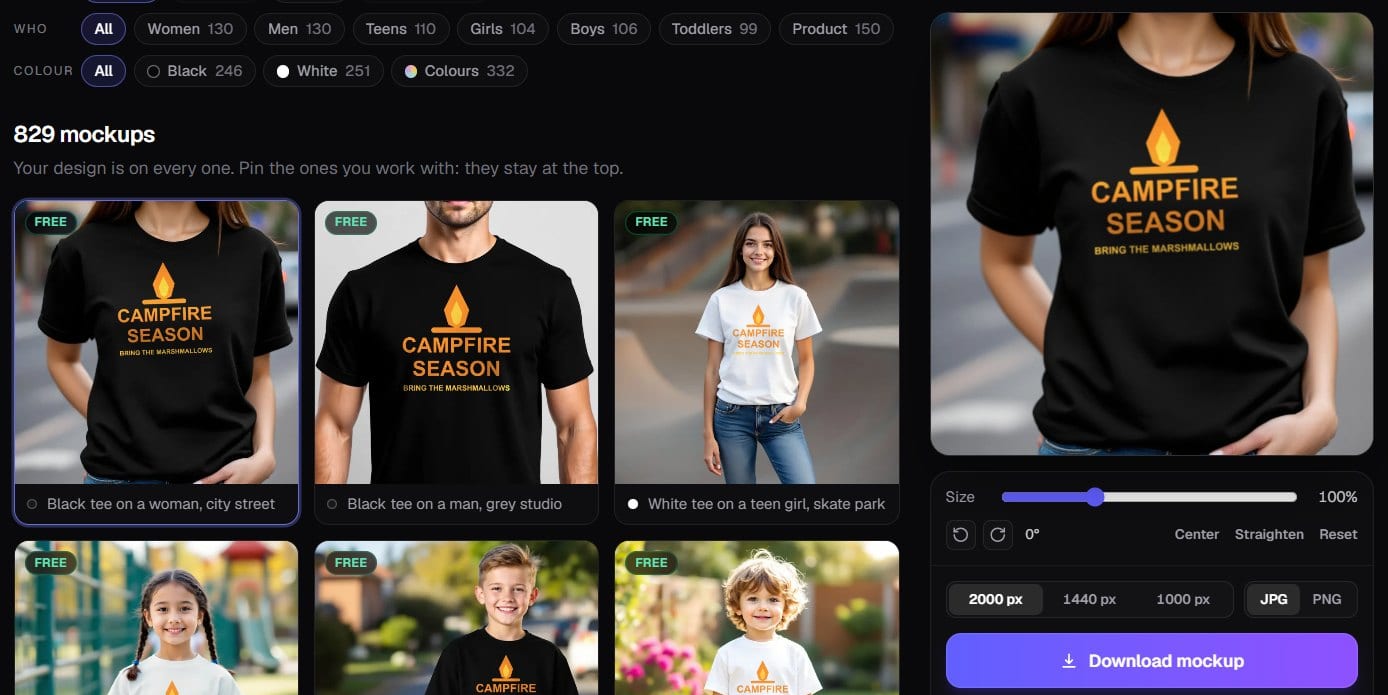
If you're about to make mockups for a batch of listings, this is the part we built into Trendlytic. The mockup generator holds more than 500 t-shirt photos plus hoodies and crewneck sweatshirts, worn by women, men, teens, kids and toddlers or laid flat and on hangers, mostly in black and white. Upload a design once and it appears on every photo; set its size and position once and download the ones you want at up to 2000 px, singly or as a ZIP. The blank photos were generated with AI, checked one by one, and had their print areas marked by hand, and your file stays in your browser. A set is free on our free mockup generator, with no account and no watermark.
What makes a good mockup for a listing
It looks printed, not pasted. Real ink bends over folds, darkens in shadow and catches the same light as the shirt. A design that stays flat and bright on a wrinkled shirt reads as fake, even to buyers who couldn't say why.
The garment is a colour you sell. A listing photo is a promise. If your provider's heather grey is warmer than the template's, the buyer gets a different shirt, so when the shade matters, add the provider's own mockup as the "this is what you get" photo. Still choosing colours? Black led on three of the four marketplaces in our count of best selling t-shirt colors.
The design is at a size the printer can print. If the print area is 12 inches wide, so is the print, whatever the template lets you drag it to. Artwork stretched toward the seams, or set so low it runs into a hoodie pocket, sets the buyer up for a letdown.
White ink is accounted for. On white and very light garments, many print services lay down no white ink, so the white parts of your artwork print as bare fabric. The mockup will show them anyway, so check your provider before listing white text on a light shirt.
The people look like the buyers. Vary age, build and style across your photos, so a shopper can picture themselves, or the person they're buying for, in it.
It reads at thumbnail size. Most shoppers first see your listing as a small tile in a grid. The first photo has to make the design legible there: a closer crop, a flat lay, strong contrast between print and garment.
It's the size the marketplace wants. Etsy recommends listing photos at least 2,000 pixels in width and height, and says a first photo under 635 pixels can show up lower in search. Download at the largest size you have and check how each image crops in the grid.
It belongs to a set. For a shirt: a clear product shot first, then a person wearing it, the colour options, the back if there's a back print, and a size chart.
Mockups and the rules: licences, brands and faces
Read the licence of every template. "Free" doesn't always mean free for commercial use. Some templates are for personal projects only, some ask for a credit line, and most forbid reselling the template. A product listing is commercial use, so the licence has to allow it.
Never borrow a listing photo. A mockup saved from image search or another shop belongs to someone else, and it's one of the quickest ways to get reported.
Keep brands out of the frame. No logo or brand label on the blank, no branded laptop or cup in the scene. A famous mark next to your design hints at a connection that isn't there.
Keep real, recognisable people out. A celebrity in your mockup, even edited in, adds a right of publicity problem to the trademark one. Use templates whose models signed releases, or photos with no real person in them. Ours are the second kind, so they go in listings, ads and social posts with no credit to give.
The design still needs clearing. A clean mockup doesn't make a phrase safe to print. Short slogans get registered as trademarks for clothing, so look the phrase up on the USPTO register first. I walked through how in print on demand trademark.
Follow each marketplace's photo rules. Etsy changed its image rules this autumn: its help page now asks most listings for at least one unedited photo of the actual item against a real background, with exceptions by type of item. Value Added Resource's coverage (October 2026, updated in November) reports that original designs a production partner prints on standard products like t-shirts or mugs can still use authorised stock mockups. Read Etsy's current help page before a big upload, and never let an image show something the buyer won't receive.
Common mistakes with mockups
Making mockups before checking the niche. A beautiful photo of a design nobody wants still sits there. Find out first whether buyers are paying for that kind of design; if one is clearly selling, make your own version for the same buyer, then photograph that.
Using only the provider's default photo. Every shop on that provider can show the same image, so yours blends into the results.
Only mood, no product. Five lifestyle photos and no clear look at the design leave the buyer guessing.
A blank "Your text here" image on a personalised item. Show a finished example with real text instead.
The rest are the checklist above, broken: a colour you don't sell, artwork bigger than the print area, text that turns to a smudge in the grid, a back print with no photo of the back.
FAQ
What is a mockup in simple terms?
A mockup is a realistic picture of what something will look like once it's made. In product selling, it's usually a photo of a blank item, such as a t-shirt or a mug, with your design placed on it so it looks printed.
What is the difference between a mockup and a prototype?
A mockup shows how something looks; a prototype shows how it works. In app and web design, a mockup is a static, full-colour screen you can't click, and a prototype is a version you can tap through. A wireframe comes before both and only shows the layout.
What is a product mockup?
A product mockup is an image of a product with your artwork applied, made before the product is produced. Print-on-demand sellers use them as listing photos, because the item is only printed once someone orders it.
Are mockups allowed on Etsy?
Generally yes for print on demand, with conditions. Etsy asks most listings for at least one unedited photo of the actual item, with exceptions by item type, and reports on the 2026 update say original designs a production partner prints on t-shirts or mugs can use authorised stock mockups. Check Etsy's current help page first.
Can I use free mockups to sell products?
Only if the licence allows commercial use. Some free templates are for personal projects only or require a credit line, so read the terms of each file; generators set their own terms too.
How do I make a mockup without Photoshop?
Use an online mockup generator or your print provider's built-in tool: upload your design as a PNG with a transparent background, pick the photos and download them. Photopea also opens most Photoshop mockup templates in the browser for free.
Conclusion
A mockup is a stand-in: the finished product, shown before it exists. For a seller it's also the first thing a buyer judges you by, so it's worth getting the colour, the size and the person right, and knowing you're allowed to use the photo at all.
I built Trendlytic, so weigh this accordingly: it's made for the step before the mockup, finding out whether a niche has buyers. Pricing starts at $19.99/month for 100 credits, which read up to 6,000 designs on the marketplaces with a verdict on every niche, plus the 1,000 top designs in Best Design Instant, re-ranked every hour. Rising marks new designs already selling, so you can tell which niches are still open, and any phrase you plan to print gets a one-click USPTO lookup. The mockup library sits in the same plan. A card is needed for the 3-day trial, which runs a $1 check. Start a 3-day trial.
What's in your first listing photo right now: a flat lay, a person, or your provider's default shot? I'd like to hear what has worked for you.
Try Trendlytic
Find your next winning POD niche in 40 seconds
Live data from TeePublic, Amazon Merch, Redbubble, and Etsy, and a one-click USPTO lookup on any phrase. Then turn any winner into a listing for a design of your own in that niche. Plans from $19.99/month.
Start researchingLiked this? Learn niche research in 5 short emails.
One email a day for 5 days: how sellers pick niches, why designs fail, and how to check yours. Unsubscribe in one click.
Keep reading
- Trendlyticplaceit alternatives
Placeit Alternatives: 8 Picks for POD Sellers in 2026
The JournalPlaceit Alternatives: 8 Picks for POD Sellers in 2026
November 16, 2026 · 17 min read
- Trendlytichoodie design ideas
50 Hoodie Design Ideas for 2026, by Niche and Print Spot
The Journal50 Hoodie Design Ideas for 2026, by Niche and Print Spot
November 14, 2026 · 18 min read
- Trendlytichow to make merch
How to Make Merch in 2026: Step by Step, Priced
The JournalHow to Make Merch in 2026: Step by Step, Priced
November 9, 2026 · 17 min read