TL;DR: Redbubble's 2026 algorithm rewards three things in this order: specific multi-word phrase tags, a title that matches those tags naturally, and a description that does NOT repeat your title verbatim. You get 15 tags — use them as phrases ("vintage 1970s bass tournament shirt"), not single broad words ("fishing"). Aim for a 60/40 split: 60% specific long-tail phrases, 40% broader category terms. Titles should be 40–50 characters, front-loaded with the strongest keyword. Descriptions should re-explain the design in natural language, mentioning use-cases and gift contexts. The biggest silent killers are trademark conflicts (which deindex listings without notice), cross-listing duplicate tags from TeePublic, and stuffing the same keyword into title + tags + description three times each. Recency, uniqueness, and engagement signals beat keyword density every time.
If your designs are getting zero views on Redbubble, it's almost never the artwork. It's the metadata.
After tracking thousands of top-selling Redbubble listings over the last two years — same niches, same product types, wildly different sales numbers — the pattern is consistent: the listings that rank well aren't the prettiest. They're the ones whose seller understood the algorithm, picked the right phrase tags, wrote a title that matched buyer intent, and didn't accidentally tripwire a trademark check.
This guide covers the whole stack: how Redbubble's search actually works in 2026, the title and tag formulas that show up over and over again on the listings that earn, what to put in your description, the SEO mistakes that bury new sellers, and the specific algorithmic traps (trademark deindexing, duplicate-tag penalties, keyword stuffing) that are easy to miss. It's long because it's a pillar piece — bookmark it, work through it section by section.
Don't miss the next one.
New POD niche analysis every Wednesday.
How Redbubble's algorithm actually works in 2026
Redbubble doesn't publish its ranking algorithm. Nobody outside the company knows exactly what's weighted at what percentage. But from what I've tracked across thousands of listings, the consistent pattern is this: search ranking is driven primarily by metadata-to-query match, then modulated by engagement signals and listing health.
Here's how it appears to work, in plain terms:
- Tags carry the most weight. When a buyer searches "retro mountain biking poster", Redbubble's first pass is matching that query against the tags field of every relevant listing. Tags are the primary index.
- Title is the second-strongest signal. A title that contains the same phrase the buyer typed gets a boost. Title also drives the click-through rate from the search results page (the listing card shows the title prominently), so titles that read naturally outperform keyword-stuffed ones.
- Description matters less than people think — but only if you do it right. A natural-language description that reinforces the keyword theme helps. A description that repeats the title verbatim or strings together 30 keywords looks like spam and appears to actively hurt.
- Engagement is the modulator. Listings that get clicks, favorites, and sales rise. Listings that get views but no clicks (because the title doesn't match the query) fall. This is why recency matters — new listings get a small "fresh content" boost so the algorithm can gather engagement data.
- Account health is the floor. Accounts with trademark strikes, copyright takedowns, or repeated violations get filtered out of search results entirely, even if individual listings are clean. This is the "shadow penalty" that sellers complain about.
What the algorithm does NOT seem to reward in 2026:
- Single broad keywords ("cat", "funny", "vintage") — too much competition, low intent match
- Hidden keywords (white text on white background, character-stuffed descriptions)
- Repeating the same keyword 5+ times across title/tags/description
- Tag spam where every tag is just a variation of "shirt" or "gift"
Now let's break each layer down.
Title strategy: the formula that works
Redbubble gives you around 50 characters for a title. Use them. Most failing listings use 12–20 characters ("Funny Cat Shirt") and waste the rest.
The pattern I see again and again on top-ranking listings:
Formula: [Specific Descriptor] + [Subject] + [Style/Vibe] + [Product Hint]
Examples:
| Bad title | Good title | Why the good one ranks |
|---|---|---|
| Cat Shirt | Vintage 1980s Black Cat Halloween Tee | Specific era + subject + occasion + product |
| Fishing Design | Retro Bass Tournament Lake Life Fisherman | Activity + niche + lifestyle keyword |
| Coffee Mug | Funny Coffee Addict Sarcastic Office Mug Gift | Tone + niche + use case + buyer intent |
| Dog Mom | Golden Retriever Mom Watercolor Floral Tee | Breed + role + style + product type |
| Disc Golf | Disc Golf Dad Vintage Frisbee Tournament Shirt | Subject + persona + retro vibe + product |
| Boho Sun | Bohemian Sun Moon Celestial Tarot Sticker | Style + symbols + niche aesthetic + product |
A few rules that hold up consistently:
- Front-load the strongest keyword. Mobile search results often truncate titles after 30–35 characters. Whatever you want a buyer to read first goes at the start.
- Write for humans first. A title that reads naturally ("Vintage Bass Tournament Fisherman Tee") outperforms a keyword salad ("Bass Fishing Fisherman Vintage Tournament Lake Tee Gift Dad") even though the second has more keywords. Click-through rate matters.
- Include the product type at the end when there's room. "Mug", "Sticker", "Tee", "Tote" all help buyers searching with the product name.
- Avoid pure trademark phrases. "Karen", "Boss Babe", "Main Character", thousands of NFL/NBA/Disney references — these will deindex your listing or worse.
- Don't repeat words. "Cat Cat Lover Cat Mom Cat Tee" is a stuffing penalty pattern.
Title is the one place where natural language and SEO have to coexist. A title that's pure SEO repels buyers. A title that's pure marketing repels the algorithm. The sweet spot is a real-sounding phrase that happens to contain 3–4 strong search terms.
The 15-tag strategy
You get 15 tags per listing. That's it. TeePublic recommends 6 to 15, Etsy gives 13, Redbubble gives 15. Treat them as 15 precious slots, not 15 spaces to fill.
The methodology that consistently wins is a 60/40 split:
- 9 tags (60%) — specific long-tail phrases that describe what your design actually is. These are where buyers who know what they want live.
- 6 tags (40%) — broader category and lifestyle terms. These pull in browsing buyers who don't yet know exactly what they want.
Let me show you a concrete example. Say you've designed a watercolor illustration of a Bernese Mountain Dog wearing a Christmas sweater.
Bad tags (almost everyone does this):
dog, cute, christmas, gift, funny, holiday, winter, pet, animal, shirt, mug, sticker, sweet, lovely, nice
Single words, generic, no buyer intent, competes with 800,000 other listings.
Good tags (60/40 split):
The 9 specific phrases:
- bernese mountain dog christmas
- bernese mountain dog mom
- watercolor bernese mountain dog
- bernese christmas sweater
- big dog lover christmas gift
- swiss mountain dog holiday
- bernese dog owner present
- berner mom xmas gift
- bernese mountain dog illustration
The 6 broader terms:
- dog mom christmas
- watercolor pet portrait
- christmas dog lover
- holiday dog gift
- cute christmas animal
- pet parent holiday
Notice what the good tags do:
- Every tag is 2–5 words. Multi-word phrases consistently outrank single broad words. A buyer searching "bernese mountain dog christmas gift" finds you. A buyer searching just "dog" sees 2 million results and you're invisible.
- Variations of the same niche (bernese, berner, swiss mountain dog) capture different phrasings.
- The broader 6 tags pull browsing buyers ("dog mom christmas" is a huge category) but never compete on a single overused word.
| Tag pattern | Why it works (or doesn't) |
|---|---|
| "fishing" | Way too broad, competes with millions, near zero intent match |
| "bass fishing shirt" | Niche + product, ranks for buyers with real intent |
| "vintage 1970s bass tournament" | Era + niche + context, very low competition, high conversion |
| "fish" | Too vague, no buyer would search this on Redbubble |
| "largemouth bass tournament dad gift" | Persona + use case = a buyer phrase |
| "fisherman" | Single word, broad, weak |
| "retro fisherman lake life vintage" | Multiple lifestyle modifiers, moderate competition, good intent |
A useful test: would a real human type this tag into Redbubble's search bar? If the answer is no, the tag is probably wasted. "Cute" is not a search query. "Cute boho sunflower tote" is.
Two more tag rules:
- No tag stuffing across listings. If you upload 20 designs with the exact same 15 tags, Redbubble appears to detect this and demote you. Vary tags per design.
- No comma-separated keyword strings inside one tag slot. One slot = one phrase. "fishing, bass, lake, tournament" in a single slot is treated as one weird tag, not four.
Keyword research for Redbubble: where to actually look
You can't tag well if you don't know what people search for. Most beginners guess. The successful sellers research.
Places I actually use, in rough order of usefulness:
- Redbubble's own search autocomplete. Type the first 1–2 words of your niche into Redbubble's search bar and look at what suggestions come up. Those are real queries real buyers have entered. "vintage cam..." autocompletes to "vintage camping shirt", "vintage camping sticker", "vintage camping mug" — that's your tag list right there.
- Top-selling listings in your niche. Search your niche, sort by best-selling, click into the top 10 listings and read their tags. (Tags are visible on each listing page if you scroll down.) Don't copy verbatim — borrow the patterns.
- Google's "People Also Ask" and autocomplete. Type your niche into Google. The questions and autocompletes reveal buyer language that often maps directly to Redbubble tags.
- Etsy and Pinterest search bars. Same trick. Both surface buyer-intent language better than generic SEO tools.
- POD niche research tools like Trendlytic, Merch Informer, or PODBase that aggregate top-seller data across platforms. These save you the manual scraping. (See my comparison of POD research tools and Trendlytic vs Merch Informer breakdown for honest tradeoffs.)
- Reddit communities for your niche. If you're targeting disc golfers, fishermen, or knitters, the way they talk about their hobby reveals tags you'd never invent at a desk. "Forehand flick", "spin reel guy", "yarn stash" — these are buyer phrases.
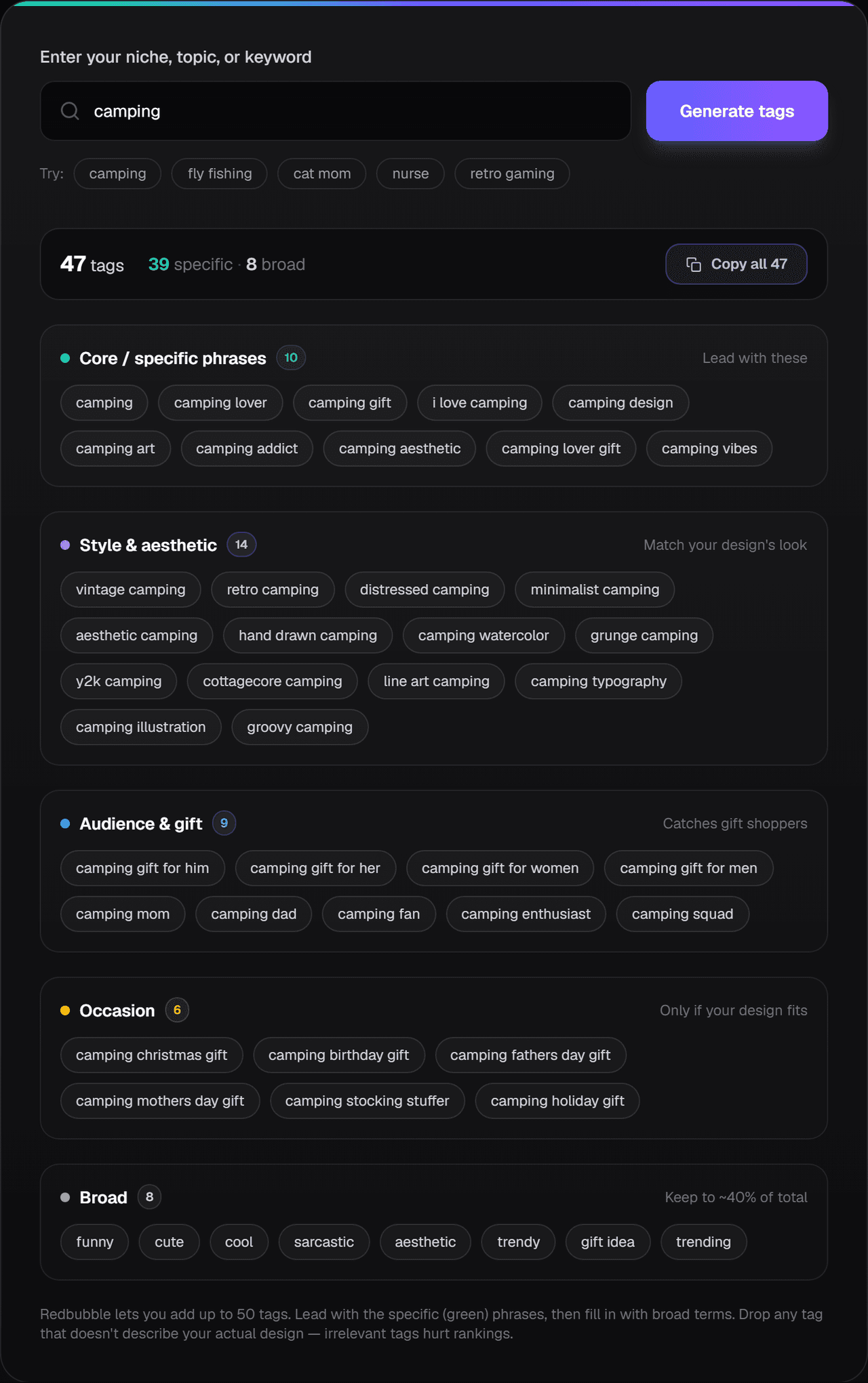
Shortcut for the brainstorm: once you have a seed phrase, our free Redbubble tag generator expands it into a full set of tags grouped specific-to-broad in one click — no login, nothing saved. Use it as a starting list, then trim and verify against the methods above. The phrases are plain buyer-search language, so the ideas carry over to TeePublic, Amazon Merch, and Etsy as raw material (each platform tags differently, so rework the list for it).
What does NOT work as keyword research:
- Generic SEO tools (Ahrefs, SEMrush) measuring Google search volume. Redbubble's internal search is different from Google. A query with 200 Google searches/month might have 5,000 Redbubble searches/month, or vice versa.
- ChatGPT keyword suggestions without verification. AI will happily invent realistic-sounding keywords nobody actually searches.
- Copying tags from a YouTube tutorial. The "free top tag list" videos are usually 2 years stale and the tags are already saturated.
What the algorithm REWARDS vs PUNISHES
Based on consistent patterns across the listings I track:
Rewarded:
- Recency. New listings get a short fresh-content boost. This is why uploading consistently (a few designs per week) beats batch-uploading 100 in one weekend then disappearing for two months.
- Unique tag combinations. Listings whose 15 tags collectively form a phrase combination not heavily used by other sellers get easier rankings.
- Engagement-positive listings. Click-throughs, favorites, sales all feed back into ranking.
- Tag-title-description coherence. If your tags, title, and description all describe the same thing in slightly different natural language, the algorithm reads this as a high-quality listing.
- Diverse product offering. Listings that have enabled most or all relevant product types (a sticker design that's also enabled on mugs, journals, totes, etc.) tend to surface more in search because the algorithm has more inventory to match against multi-product queries.
Punished:
- Keyword stuffing. Same word repeated across title, tags, and description more than 2–3 times total.
- Generic single-word tags like "cat", "art", "design", "shirt".
- Duplicate listings. Uploading the same design twice with slightly different titles is a classic deindex trigger.
- Trademark conflicts. Listings that match trademarked phrases get deindexed silently (more on this below).
- Cross-listed tag copies. If you upload the exact same 15 tags from TeePublic to Redbubble, you're flagged as low-effort cross-listing. Adjust tags per platform.
- Hidden keywords. White-text-on-white description spam is a 2018 trick. It now gets you penalized.
Description: the one most people get wrong
Most sellers do one of two things with the description:
- Leave it blank.
- Copy-paste the title and add a list of 30 keywords.
Both are wrong, and the second is worse than the first.
What the description should do: explain the design in natural language, mention 2–3 use cases or gift contexts, and include the niche keywords organically — not in a list.
A good description for the bernese mountain dog example above:
Hand-illustrated watercolor of a Bernese Mountain Dog wearing a cozy red Christmas sweater. Designed for Berner moms, Swiss mountain dog owners, and anyone whose holiday wouldn't be complete without their big fluffy companion. Perfect as a Christmas gift for the dog lover in your life — works as a tee, mug, holiday sticker, or wrapped-up holiday card on its own.
That description does several things at once:
- Reinforces the keyword theme (bernese, swiss mountain dog, berner, christmas, dog lover)
- Names the buyer (dog mom, owner, gift-giver)
- Names use cases (tee, mug, sticker)
- Reads like a human wrote it for another human
What NOT to do:
Bernese Mountain Dog Christmas Sweater Tee. Tags: bernese, mountain, dog, christmas, sweater, tee, gift, mom, dad, owner, lover, swiss, berner, holiday, xmas, present, cute, funny, watercolor, illustration, pet, animal, dog mom, holiday gift, christmas gift, dog lover, etc.
That's keyword stuffing. The algorithm appears to actively demote this pattern in 2026.
Description sweet spot: 60–120 words. Long enough to give the algorithm real text to read, short enough not to look spammy. Three short paragraphs is plenty.
Categories and product range: do they affect SEO?
Yes, more than most sellers realize.
Redbubble appears to use the primary product (the one your design is first uploaded against) as a category signal. If your design is uploaded primarily as a sticker, Redbubble's search treats it as a sticker-first listing — meaning queries that include "sticker" rank it higher than queries that include "shirt".
Practical implications:
- Match the primary product to where your design actually sells best. A bold typography design's primary product should probably be a tee, not a mug. A small detailed illustration should probably be a sticker.
- Enable all relevant products (Redbubble's "available products" toggle) — but disable the ones where your design clearly doesn't fit. A typography design on a pillow looks bad and tanks your overall listing engagement.
- Don't enable everything by default. Listings with 70 active products but only 3 that look decent get poor engagement signals on most of them, which pulls down the whole listing.
Categories also affect the collection pages Redbubble auto-generates ("Christmas Stickers", "Funny Mugs", "Cat Tees"). Designs in well-tagged listings show up in these collections, which drives browsing traffic separate from direct search.
Trademark conflicts and "shadow penalties"
This is the silent killer most new sellers don't realize is happening to them.
Redbubble's trademark enforcement in 2026 operates on three levels:
- Active removal. Clear-cut infringement (Disney characters, NFL team names, exact trademarked slogans) gets the listing removed and you get a strike. Repeat strikes suspend the account.
- Shadow deindexing. A listing that contains a partial trademark match — say, your title or a tag matches a registered word mark — can be silently removed from search results without being formally taken down. You can still see it in your dashboard. Nobody else can find it.
- Account-wide chilling effect. Multiple shadow-deindexed listings appear to drag down the search ranking of your other listings too, since account-health signals are part of ranking.
Phrases that are commonly trademarked and silently bury listings:
- "Karen" (yes, the meme)
- "Boss Babe"
- "Main Character Energy"
- "Live Laugh Love" (registered in several product classes)
- Many sports team names + city combos
- Many band names, even old bands
- Most cartoon character names
- Many influencer catchphrases
The pattern I see often: a seller uploads 30 designs over a month. 4 of them silently get deindexed for trademark partial matches. The seller never gets a notification. They just notice that their account stops getting search traffic. They blame "the algorithm" when in reality 4 listings poisoned the account's ranking signals.
The fix: Run every keyword phrase through the USPTO trademark search before you upload. If a Live trademark exists in Class 25 (apparel), Class 21 (mugs), Class 16 (paper goods/stickers), or Class 18 (bags), skip the phrase.
This is tedious. It's one of the reasons I built Trendlytic: the USPTO lookup is a single click inside the app, and Keyword Research flags the phrases someone has already looked up. But you can do it manually for free if you have time.
Common Redbubble SEO mistakes
After auditing hundreds of low-performing accounts, the same mistakes show up over and over:
1. Using single-word generic tags. Tags like "shirt", "gift", "cute", "funny" waste slots. Replace with 2–5 word phrases that actually match buyer queries.
2. Stuffing the same keyword everywhere. "Cat" in the title, "cat" tag, "cat" three times in description. The algorithm appears to count total occurrences and demote stuffing. Use the keyword once, then use synonyms and related phrases.
3. Copy-pasting tags across all your designs. If 50 of your listings share the same 12 tags, you're competing with yourself and Redbubble flags this as low-effort. Vary tags per design.
4. Cross-listing tags directly from TeePublic. TeePublic's own guidance pushes toward mostly single-word tags and gives you a separately weighted "main tag" field. Redbubble has neither, and it caps you at 15 tags. Bringing your TeePublic tag list verbatim to Redbubble is a known underperformance pattern. Pick the best 15 and rephrase them as multi-word buyer searches.
5. Putting the product type as the first word in the title. "Tee — Vintage Cat Christmas" is weaker than "Vintage Cat Christmas Tee". Front-load the strongest descriptor.
6. Skipping the description. A blank description gives the algorithm nothing to read and signals low-effort listing. Write 60–120 words of natural language.
7. Not checking for trademark conflicts. As covered above, partial trademark matches silently deindex listings. Always USPTO-check first.
8. Uploading 80 designs in one batch. Redbubble's algorithm appears to throttle accounts that upload massive batches at once. Spread uploads over weeks. Bonus: each new upload gets a small recency boost.
9. Disabling almost all product types. Sometimes sellers enable only stickers because they think it'll focus their listing. This actually reduces the algorithm's surfacing opportunities. Enable all appropriate products, disable only the ones where the design looks bad.
10. Treating descriptions as a second tag field. Description should read like a paragraph, not a tag list. The algorithm clearly distinguishes natural prose from comma-separated keyword spam.
SEO checklist for every new listing
Before you hit "Publish" on any listing, run this:
- Title is 40–50 characters, front-loaded with the strongest keyword
- Title reads like a natural phrase (no keyword repetition, no tag-list-style stuffing)
- All 15 tag slots filled
- Tags follow the 60/40 split: 9 specific phrases + 6 broader category/lifestyle terms
- Every tag is 2–5 words; no single broad words
- No tag is duplicated across more than 5 of your other listings
- Primary product matches where the design actually fits best
- Inappropriate product types disabled (don't put typography on a pillow)
- Description is 60–120 words of natural prose
- Description mentions 2–3 use cases or gift contexts
- Description does NOT repeat the title verbatim
- No trademark conflicts (USPTO Live status checked in relevant product classes)
- No copyright conflicts (no fan art, no celebrity references, no song lyrics, no movie quotes)
- Mature content correctly flagged if applicable
If you want to speed this up for every design, save the checklist somewhere you can reference it. Sellers who run the checklist religiously have noticeably more consistent ranking than those who wing it.
When to redo your tags vs leave them alone
A common question: "I have 200 old listings. Should I go back and re-tag them?"
The answer depends on what the listings are doing.
Leave them alone if:
- They're getting steady views and occasional sales — the algorithm has them indexed where they belong; touching them resets the recency clock and you risk losing position.
- They were uploaded recently (less than 30 days ago) — give the algorithm time to settle on a ranking.
Re-tag them if:
- Zero views in 60+ days despite being in a real niche — the metadata is the problem, fix it.
- You used single-word generic tags — almost guaranteed re-tag opportunity.
- You discovered a trademark conflict in the title — fix immediately or risk account-wide drag.
- Your tags are duplicated across many of your other listings — variation is overdue.
When you re-tag, edit slowly. Update 5–10 listings per week, not all 200 at once. Massive batch edits appear to trigger algorithmic scrutiny that can hurt more than help. Treat re-tagging like compound interest: small, consistent improvements.
Also: when you edit a listing, the recency boost resets, which can briefly help a stale listing get re-evaluated. This is a real lever — but use it only when the metadata genuinely improved.
How long does Redbubble SEO actually take?
Realistic expectations matter. Sellers quit because they expected results in 2 weeks.
The typical pattern I see:
- Week 1–2: New listing in initial indexing phase. Gets a small recency boost. May get a handful of impressions.
- Week 3–6: Algorithm evaluates engagement. Listings that get clicks and favorites climb; those that don't drift down.
- Month 2–3: Established ranking starts to settle. Good listings begin getting consistent organic search traffic.
- Month 4–6: First sales for well-tagged niche designs typically arrive in this window for new accounts.
- Month 6–12: Compound effect kicks in. Account-health signals improve, multiple listings reinforce each other, and consistent uploaders see a clear ramp.
A single well-tagged listing in a real niche can take 2–4 months to start earning. A whole shop hitting consistent monthly income usually takes 6–12 months.
This is why I push so hard on consistency over volume. Twenty well-researched, well-tagged listings beat 200 lazy ones, every time. (See Is Redbubble worth it in 2026? for honest income expectations.)
Tools and resources
A short list of things that genuinely help, no affiliate sponsorship:
- USPTO trademark search (tmsearch.uspto.gov) — free, slow, essential. Check every keyword before upload.
- Redbubble search autocomplete — free, built into the platform, underused. Your best keyword research tool is the search bar itself.
- Trendlytic — my own tool, $19/mo Starter for 100 niche searches with USPTO check built in. Specifically built around the workflow described in this article. (Sign up)
- Merch Informer / PODBase / Niche Scraper — established alternatives, more general-purpose. See my comparison of POD research tools.
- Pinterest trends — free, surprisingly useful for finding niche-specific buyer language 6–12 months ahead of saturation.
- Etsy search bar — free, autocomplete reveals gift-buying language that cross-applies to Redbubble.
- Google's "People Also Ask" — free, reveals natural-language questions buyers ask in your niche.
You don't need all of these. Pick one keyword research approach (Redbubble autocomplete + USPTO is the minimum) and stick with it for 90 days before adding more tools.
FAQ
Q: How many tags should I use on Redbubble? A: All 15. Use them as multi-word phrases (2–5 words each), not single words. Wasted tag slots are wasted ranking chances.
Q: Should I use the same tags on every design? A: No. Vary tags per design. If you re-use the same 12 tags across 50 listings, you'll compete with yourself and Redbubble appears to flag this as low-effort.
Q: Are single-word tags ever useful? A: Rarely. A single broad word like "cat" competes with millions of listings. A specific phrase like "vintage tabby cat reading book" has dramatically less competition and far higher buyer intent.
Q: Can I copy successful sellers' tags? A: Borrow the pattern (how they structure phrases), not the literal tags. Word-for-word copying tells the algorithm your listing is duplicative.
Q: Should my title and tags overlap? A: Some overlap is good — the algorithm rewards coherence between title and tags. But don't make every tag a chunk of your title. Use synonyms and adjacent phrases too.
Q: How important is the description? A: More than most beginners think, less than the tags. A natural 60–120 word description that doesn't repeat the title verbatim helps. A blank description or a keyword list both hurt.
Q: Will keyword-stuffing my title get more views? A: Short-term maybe, long-term no. Stuffing hurts click-through (real buyers skip ugly titles), which then hurts ranking. The algorithm appears to weigh CTR heavily.
Q: How do I know if I have a trademark problem? A: Search every key phrase in your title and tags on tmsearch.uspto.gov. Look for "Live" status registrations in the product classes relevant to you (apparel = 25, mugs = 21, paper/stickers = 16, bags = 18). If a Live trademark matches, skip the phrase.
Q: Why is my listing getting impressions but no clicks? A: Usually the title doesn't match the search query well enough, or the thumbnail looks generic. Rewrite the title to match buyer intent more precisely, or improve the design's visual appeal in the thumbnail.
Q: Can I just hire someone on Fiverr to do my SEO? A: You can. Most are mediocre and use the same recycled tag lists across dozens of clients, which actively hurts you. If you outsource, demand custom-researched tags per design, not a templated list.
Redbubble SEO best practices for 2026 (quick recap)
If you only remember a handful of Redbubble SEO tips for 2026, make it these — they cover the listing best practices for tags, titles, and descriptions that move the needle:
- Title: 40–50 characters, strongest keyword front-loaded, reads like a real phrase. (See the title formula above.)
- Tags: fill all 15, use the 60/40 split — 9 specific multi-word phrases, 6 broader category terms. No single broad words.
- Description: 60–120 words of natural prose, 2–3 use cases, niche keywords woven in — never a comma-separated keyword list, never a copy of the title.
- Keyword research: start with Redbubble's own autocomplete, top-seller tags, and Pinterest/Etsy search bars — Redbubble keyword research is about buyer language, not Google volume.
- Trademark check: run every phrase through USPTO before you upload, or one silent deindex can drag your whole account down.
- Consistency: upload a few well-tagged designs per week, don't batch-dump, and re-tag dead listings slowly.
For where Redbubble fits in the bigger picture, see our complete print on demand guide, and if you want the tags generated for you, the free Redbubble tag generator builds a specific-to-broad set from any seed phrase.
Final thoughts
Redbubble SEO isn't a secret art. It's a slow, methodical discipline: research what real buyers search, write titles that read like real phrases, fill all 15 tag slots with specific multi-word phrases, write descriptions that don't stuff keywords, and ruthlessly check for trademark conflicts before you upload.
Most sellers fail at Redbubble not because the platform is broken, but because they treat it like a slot machine: dump designs in, hope something hits. The sellers who earn consistently treat it like a search engine — because that's what it is.
If you want to compress the keyword research and trademark-check workflow into one tool, Trendlytic is the one I built specifically around the system in this guide. $19/month gets you 100 niche searches with a one-click USPTO lookup, so you can catch a registered phrase before you upload. If you'd rather DIY the workflow with the free tools listed above, that's also a legitimate path — slower, but it works.
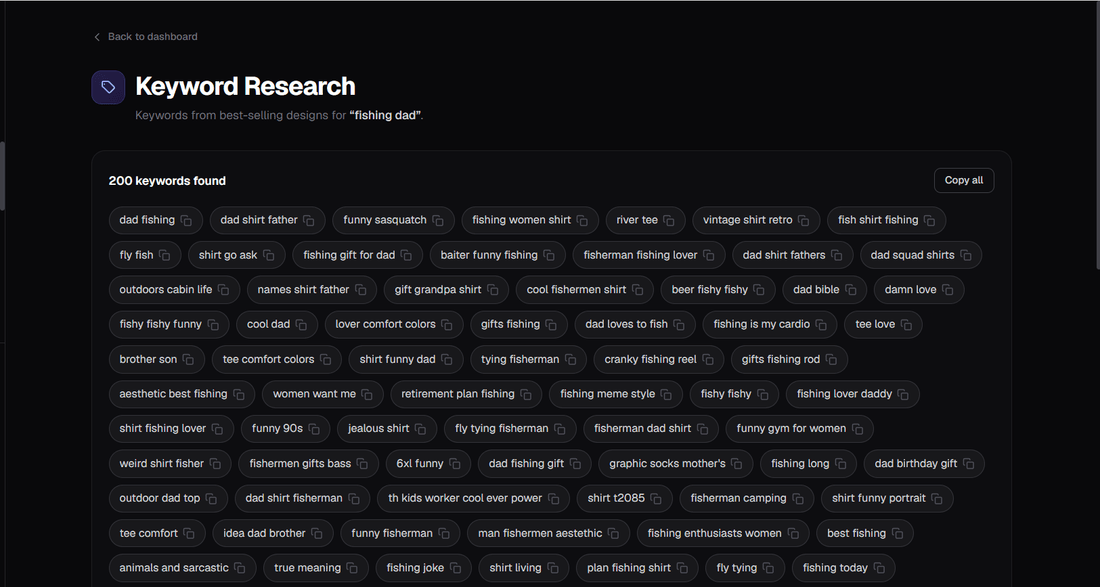
If you'd rather not reverse-engineer tags by hand, Trendlytic's Keyword Research pulls the real tags and phrases that best-selling designs already use for a niche.
Either way, the metadata is the lever. Pull it carefully.
What's the niche you're trying to rank in right now, and which of the mistakes above might be holding you back?
Like this? Get one like it every Wednesday.
Niche data, trademark alerts, one tactic per week.
Try Trendlytic
Find your next winning POD niche in 40 seconds
Live data from TeePublic, Amazon Merch, Redbubble, and Etsy, with a trademark check built in. Then turn any winner into a listing for a design of your own in that niche. Plans from $19/month.
Start researchingKeep reading
- Trendlyticwhere to sell ai art
Where to Sell AI Art: The Best Marketplaces (Honest Guide)
The JournalWhere to Sell AI Art: The Best Marketplaces (Honest Guide)
July 18, 2026 · 18 min read
- Trendlyticcan you sell ai art on redbubble
Can You Sell AI Art on Redbubble? What's Allowed
The JournalCan You Sell AI Art on Redbubble? What's Allowed
July 17, 2026 · 15 min read
- Trendlyticprintify alternatives
8 Best Printify Alternatives in 2026 (Faster & More Reliable)
The Journal8 Best Printify Alternatives in 2026 (Faster & More Reliable)
July 6, 2026 · 14 min read